


By Brian McCracken, AI Strategy Expert at The Provato Group, combining AI/machine learning and frontend development to create intelligent, discoverable web experiences.
March, 2026
Legacy applications are responsible for keeping businesses running, but they can also slow down innovation, make adding new features difficult, increase outages, and create holes in your security stance. Application modernization solves all of those issues. And now, with the use of generative AI you can modernize faster than ever before by letting the AI do the evaluation while engineers remain in control of what ships.
What this guide will give you:
- The plain-English definition of application modernization
- The three most common modernization strategies
- Where AI helps (and where it’s shouldn’t be trust blindly)
- A safe, incremental modernization pattern that mitigates risk
- A step-by-step starter plan you can actually use
What is application modernization (and how is it different from migration)?
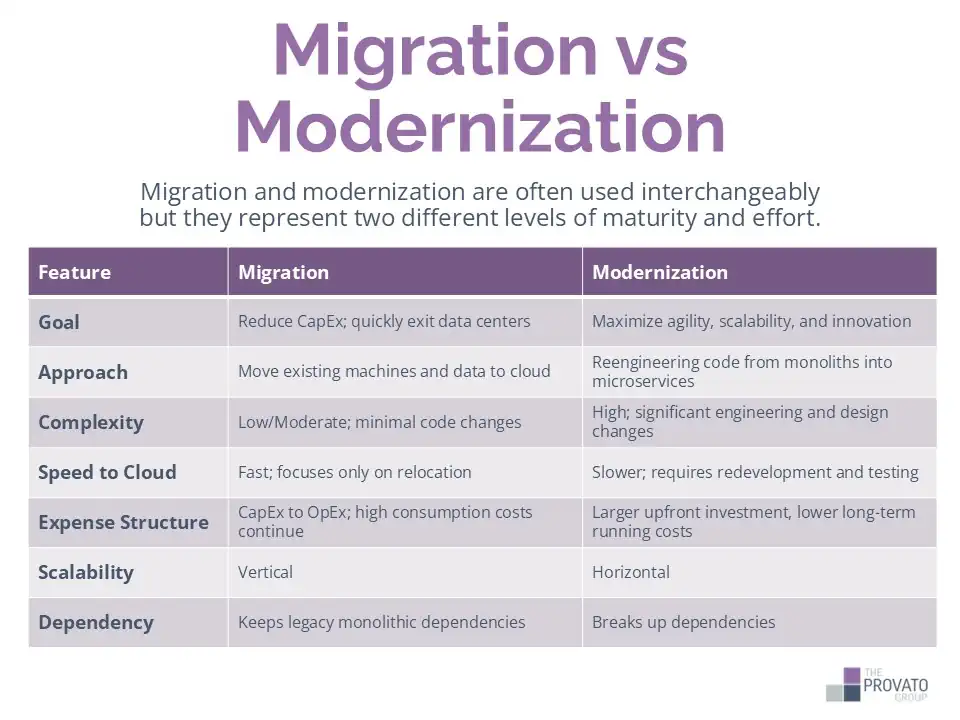
Application modernization means improving an existing legacy application so it’s easier to add new features to, innovate with, follows modern security best practices (particularly important if there are regulatory requirements), and are able to operate on modern platforms (cloud, managed services, automated delivery.) This process often means that the architecture of the application has to be evaluated and changed, the app will be recoded in currently supported frameworks and languages, upgrading the infrastructure the app is hosted on, and modernization operations.
Migration only addresses moving an existing application that you already have. For example, your app may run on-premises, but migration would be needed to get it hosted and running from the cloud. Modernization is all about improving what you have to improve it’s long term value and viability rather than just changing where it lives.
The 3 modernization strategies (simple comparison)
A helpful question to ask before any modernization project is ‘How much do we change the app?’ Microsoft’s modernization guidance sets out three different approaches that are commonly used.
| Strategy | What it means (beginner version) | When it fits best |
|---|---|---|
| Replatform | Move to a better runtime/platform with minimal code change | You need quick wins and stability |
| Refactor | Change parts of the code to use modern services/patterns | You want better maintainability and faster delivery |
| Rearchitect | Redesign major parts of the system | The current architecture is limiting scale, resilience, or speed |
We find the most success by combining elements from all of these. For example, we might replatform an app first to reduce any operational issues before refactoring the high-value, high-impact areas.
Where AI helps most in modernization (the “Understand → Plan → Change → Prove → Operate” model)
The biggest bottleneck in legacy application modernization projects is not refactoring the code, but rather first understanding the existing code, identifying keys areas for change, and proving that those changes are safe to make without compromising the stability of the legacy system. While AI helps across the entire modernization lifecycle, it excels when used during the discovery phase, especially in generating documentation and artifacts that the engineers will need while carrying out their work.
1) Understand: make the old system legible
Generative AI does a great job of summarizing legacy codebases, explaining modules and their connections, and sets the stage for a rapid transfer of knowledge.
This is particularly useful when:
- The original developers are gone
- Documentation, if it exists, is outdated
- The system is large and tightly coupled
Our rule of thumb is to treat the summaries AI creates as a starting point. They much be validated by human engineers and run against real-time evidence such as logs, traces, and metrics.
2) Plan: turn understanding into priorities and requirements
AI accelerates planning artifacts like:
- User stories and functional descriptions
- API specifications (e.g., OpenAPI or Swagger)
- Component diagrams and interaction charts
These things help engineering teams go from guessing what a module does to knowing exactly what to modernize and how to test it to be certain that it’s done.
3) Change: AI assisted code refactoring and build pipelines
Generative AI can lay the ground work for proposed refactoring steps. Once work has begun, AI helps the engineers maintain code consistency across all refactoring efforts throughout entire codebases. As the AI automates best practices the new refactored code will naturally gain some standardization which helps with long term maintainability after the modernization has wrapped up.
AI is also used to build, test, and deploy newly refactored software. Once integrated, the AI helps improve security, prevents failures through pattern matching, and optimizes infrastructure costs.
4) Prove: test and security validation
One of the key goals of modernization is preserving critical behaviors. AI helps engineers with this through:
- Test cases (unit, integration, regression)
- Threat-model prompts and security verification
- Log and infrastructure validation
“If you can’t test it, you can’t safely modernize it.” You can think of understanding codebases as one side of a coin, and testing the newly refactored code as the other side of the same coin. Automated testing reduces errors and reworks, improves your time-to-market and builds trust directly into the modernized app.
5) Operate: reduce the chances of “it worked in dev” issues
No matter how smooth a modernization project goes, there’s bound to be some small issues along the way. They may be new issues introduced by the modernization, or they may be old issues that the modernization brought to the surface.
When they happen, AI can be used to produce runbooks, explain alerts, and summarize incident patterns. These things are particularly helpful if the app is also moving to a new operational model (such as cloud-native, or a new deployment cadence.)
A low-risk way to modernize: the Strangler Fig pattern
There are commonly two approaches to legacy system modernization. They are the safer incremental replacement, and the more risky “big bang rewrite.”
Big-bang rewrites are tempting, letting you start with clean code, modern frameworks, and proper architecture all at once. Unfortunately, they tend to fail due to the hidden complexities that years of edge cases present, as well as the constantly moving target caused by the continuation of business while the rewrite is happening. Contrast this with incremental replacement using the Strangler Fig pattern which modernizes systems by gradually routing functionality from the old app to the newly coded features and services until the legacy platform can be fully retired.
You can think of this transition as happening in three steps:
- Transform (build the new capability with fresh code)
- Coexist (running the legacy app alongside the newly updated portions)
- Eliminate (removing the legacy portion once the updated replacement is proven)
Just like with other areas of modernization, AI benefits the Strangler Fig pattern as well. Artificial intelligence helps engineers more quickly understand dependencies, document requirements, and generate tests to shrink the overall implementation window. Despite these benefits, there still needs to be qualified humans in the loop to determine important factors such as what parts of the legacy system get addressed first, and how are they later validated.
A 7-step AI modernization starter plan (checklist)
When you are new to modernization, it’s best to start small which will help you mitigate risk. The checklist steps are:
- Inventory what you have – create lists of apps, owners, the tech stacks used, SLAs, and business criticality
- Start with a ‘thin slice’ that will have high impact – it’s best to start with a single feature, workflow, or API to help align yourself with the strangle-style modernization
- Clear define what success looks like – choose 2 or 3 easily measurable outcomes (performance, cost, reliability, security, etc.) to judge success by
- Use AI to accelerate discovery and documentation – create summaries, diagrams, and specs of the legacy system to validate with engineers working on the project
- Decide on your modernizations strategy (replatform, refactor, rearchitect, etc.) – your strategy should be aligned with your goals and risk tolerance
- Build proof such as tests, security checks, and rollback plans – these need to be treated as first-class deliverables that the project can not start without
- Ship incremental changes to learn from – minimize your exposure by releasing small changes with easily measured outcomes, then repeat
Common pitfalls (and how to avoid them)
It can be easy for businesses to run into application modernization challenges. The causes often come down to a combination of strategic, technical, and operational missteps along the way.
AI isn’t always right
The “AI said it’s right” confidence trap is real. Each response generated by an LLM will be delivered with striking confidence. The truth is that LLMs work based on probabilistic guessing, but they present their guesses with such fluency that humans will naturally associate it with expertise.
The solution to this is to be sure every change has required tests to be sure they meet pre-establish acceptance criteria. Ai will dramatically speed up modernization, but a team still needs to be in place to double-check its work.
Not laying out security requirements first
Generating code with AI is one of the most known generative AI uses cases, but you still need to be sure that security controls are a part of the design. Laying out predefined security architectures first and having the AI develop code with them as a known requirement is a far better position to be in rather than trying to integrate security later. Testing needs to be a part of the design as well. AI should be leveraged to generate and optimize the right tests, code, and data for the security feature being evaluated.
Mistaking migration for modernization
When applications are moved to a new hosting platform (such as cloud), there may be some minor code adjustments that are needed to make that move successful. It’s easy to think of a new hosting platform and new code for that platform as ‘modernization’ but all you are really doing is relocating technical debt, not reducing it.
When to bring in help (and what a good partner does)
The biggest benefit of bringing in a modernization partner is reducing risk. If any of the following items are true, a partner can help you manage risk:
- If your systems are both business-critical and poorly documented (if at all)
- You need modernization but are unable to pause feature delivery for the legacy system
- You’re not sure which strategy fits your workloads and business processes
- You have multiple apps to modernize and need a predictable, repeatable pattern
A strong application modernization partner will show you:
- Well thought out, customize workload-by-workload strategies, not a one-size-fits-all approach
- A predetermined plan for acceptance testing, and core security integration
- How they approach incremental delivery versus a risky big-bang set of changes
- A set of outcomes that are both measurable and directly tied to your business goals
FAQs
Does AI automatically modernize apps?
No, not safely. AI is best used for understanding, documentation, and implementation, but a team of engineers are still need to make the important architectural decisions and validate the AI output with tests and additional runtime evidence.
Is the Strangler Fig pattern only for microservices?
No. While it is often used for incremental transitions from monoliths to services, the core concept is incremental replacement with coexistence which is useful across many architectures.
How is risk reduced when AI is involved?
Keep humans in the loop at all phases of the process to review, test, and validate changes. before the modernization begins, be sure that all external tools used in the pipeline are up-to-date/patched against known vulnerabilities. Software compositions analysis (SCA) tools may be needed to identify and address vulnerabilities in dependances. There’s also the human factor, so be sure to keep potential malicious actors out of the process with measures such as role-based access control (RBAC.)
Talk to an architect
If you want to see how we use AI to safely modernize applications submit our contact form and we will help determine a practical modernization path for your environment.