

It’s easy to think that web apps and mobile apps are the same, but it’s not as easy to tell which one is right for your business. Think of your favorite social media platform and how you may use it on a browser one moment, but then you’re opening the corresponding app on your smartphone to continue. A browser-based application will work on either your computer’s browser or your smartphone’s, but mobile software is made specifically to use on your mobile device.
So, before you decide whether you want a cloud-based app or a smartphone application developed, it is important to understand what separates the two. What makes them different? What are their pros and cons?
Let’s take a closer look and compare web apps and mobile apps to reveal their pros and cons, and what key features make each stand out.

What is the Difference Between Web and Mobile Applications?
The main difference between web and mobile applications is that web applications can be accessed through the web browser of any device with internet connectivity, while mobile applications must be downloaded and installed onto smartphones or tablets and can only be used on those devices.
Browser-based web apps offer faster development, lower costs, dynamic scalability, wide device compatibility, and universal browser access making them ideal for businesses that need adaptable cross-platform solutions. Mobile applications require more costly OS-specific development, have slower deployment/updates cycles, but are able to offer offline functionality when needed.
How Do They Compare?
(83.3%)
(16.7%)
What Are Web Apps?
Web apps, often called web or cloud applications, are browser-based software that represent a dynamic intersection between technology, team collaboration, real-time data sharing, and accessibility. Unlike traditional software, online hosted web apps are not bound to a single device they are installed on and eliminate both location and hardware limitations.
Cloud native web applications provide businesses with a wide range of benefits including agility, cost savings, centralized systems and data management, robust security, but most importantly they offer flexibility to address future priorities and business goals. Researchers from the Electronics and Telecommunications Research Institute conducted a 2014 study on the benefits of web applications for businesses noting that they provided a fast, cost-efficient route for adaptation to meet evolving business needs, meaning new features and functionalities could be quickly added to them as those tools were needed.
What are the Advantages of Web Apps?
- Shorter time-to-market: Web-based apps offer faster development cycles than mobile apps as they have fewer device-specific challenges to address or overcome.
- High Availability: Cloud-hosted web apps maintain uptime through redundant servers, automatic failover, and load balancing.
- No Need for Store Approvals: Web apps don’t need an app store approval to be launched, but most mobile apps do with some exceptions such as internal enterprise or corporate mobile apps.
- Automated Maintenance: Thanks to cloud infrastructure, updates are centralized, ensuring consistent and reliable performance for all users.
- Consistent User Experience and Interface: Web apps offer a consistent experience as they are bound by trying to work across a wide range of different devices and their varied limitations.
- Better Performance: Online-hosted apps leverage the latest cloud-native technologies to deliver best-in-class performance to all users no matter the age or processing power of the device they are using.
- Compatible with Older Devices: So long as your device is capable of running a browser, even older devices may use a web app.
- No Hardware Expenses: Since web apps are handled by a cloud host, any hardware upgrades are related to the server, which would be done by the cloud provider.
- No Installation: Web apps conveniently take up little room on a device because there is no installation required.
- Cost-Effective Development: With a single codebase and a more straightforward development process, web apps may be more cost-effective to pursue vs mobile apps.
- Security: Web apps may utilize a variety of server-side security measures like firewalls and data encryption.
What are the Disadvantages of Web Apps
- Online-only: Web applications require internet access.
- Ongoing Hosting Expenses: Web apps need to be hosted in the cloud and will have additional on-going costs associated with that hosting.
What Are Mobile Apps?
Mobile apps are software solutions built to run directly on a mobile device. These handheld applications introduced a significant move away from traditional on-premises software, providing users with unprecedented mobility and convenience, offering access to important functions and information whenever the user needs.
These kinds of applications provide businesses with a host of benefits such as enhanced scalability, offline functionality, and even user engagement features like push notifications. Mobile apps also allow for the use of device-specific functions such as GPS location and camera. These benefits have led to a high adoption of mobile apps since the first Apple iPhone brought mobile apps to the mainstream. According to a Youngstown State University study by Rakestraw, Eunni, and Kasuganti, the mobile app industry’s worth had grown to approximately $100 billion by 2015. The convenience of having almost any kind of application on your mobile device has led to the staggering variety of mobile apps available today.
What are the Advantages of Mobile Apps?
- Offline Operations: Mobile apps can have the ability to work offline.
- App Store Presence: Smartphone apps can be promoted and sold in dedicated app stores, making them easy for mobile users to find.
- Device-Specific Features and Functions: With access to a device’s system resources, a smartphone app can perform more functions and leverage native features such as touch gestures, device tilt, camera, and fingerprint scan security.
What are the Disadvantages of Mobile Apps?
- More Expensive Development: Mobile apps tend to be more costly because they need to be developed from scratch for each different mobile operating system or device type (phones and tablets).
- No Desktop Use: Mobile apps are made for mobile devices only.
- Storage Requirements: Smartphone apps require storage space to install and update them.
- App Store Dependent: With some exceptions such as internal-use enterprise apps, most mobile apps rely on app stores to be approved and available.
- Revenue Loss: App stores take a percentage of any mobile app sales revenue. Your business may lose a portion of what should be your returns.
- Security Vulnerabilities: Mobile apps can be vulnerable to malicious files stored on the phone by other apps, data leakage, device rooting/jailbreaking, and insecure data transmission.
Web Apps vs Mobile Apps: Security
The main difference between web apps and mobile apps when it comes to security is while web apps operate in controlled server environments protected by enterprise firewalls, mobile apps run on vulnerable end-user devices, creating a larger attack surface, extensive data collection, and potentially compromised device security.
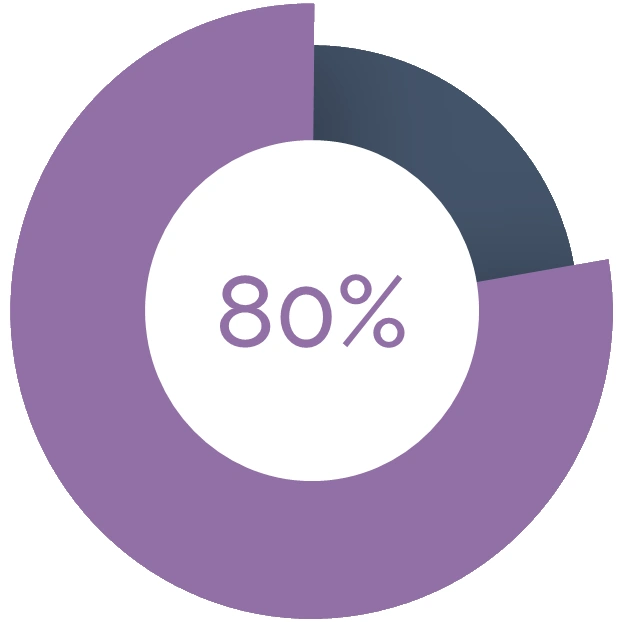
Security is a known ongoing concern for mobile apps. In a 2020 study by Balapour, Nikkhah, and Sabherwal in the International Journal of Information Management, while it was reported that “an average of 6140 mobile apps were released through the Google Play Store every day from the third quarter of 2016 to the first quarter of 2018”, their research had shown that “80% of users” do not use their mobile apps or uninstall them completely after three months. The research goes on to explain “Among the reasons why individuals do not install or continue to use mobile apps, user’s concerns about security and privacy risks are found to be the most salient.”
Research has shown that 80% of users don’t use or uninstall mobile apps within three months citing privacy and security concerns.
It is not just hackers who are interested in exploiting vulnerabilities. In some cases, it is third-party developers themselves. In the previously mentioned Youngstown State University study, the researchers had found that “Both Google and Apple, the mobile industry’s top players, were frequently challenged by issues of privacy and security arising from some third-party app developers who sought to exploit their operating systems for illicit gains.”
As a business, the skepticism around mobile apps and their security may lower your app’s adoption rate and subsequently your ROI. Inversely, users may feel more comfortable accessing a cloud-based application.
Web Apps vs Mobile Apps: Accessibility
The main difference between web apps and mobile apps regarding accessibility is that web apps primarily rely on keyboard navigation and WCAG standards with cross-browser screen reader support, while mobile apps are built around touch-based interactions and platform-specific accessibility APIs for iOS and Android. WCAG guidelines provide a consistent and well-tested framework that benefits both developers and users. While mobile apps require separate implementations for iOS and Android accessibility features, web apps can use a single codebase to maintain uniform accessibility standards across all platforms and devices.
In a 2018 study by Ballantyne, Jha, Jacobsen, Hawker, and El-Glaly, 25 of the most popular apps on the Google Play Store at the time of the study were evaluated for their accessibility based on clearly defined guidelines, especially for how well they accommodate users with disabilities. It was found that 8 (32%) of those apps had a less than 75% compliance rate in general. Additionally, most of the apps “exhibited issues with the screen reader” while bearing other failures in compliance.
In the study’s findings, popular social media mobile apps like Facebook, LinkedIn, and Instagram accounted for a grand total of 31 system violations, 125 design violations, and 61 content violations for a total of 217 violations. Between other mobile app categories like Productivity, Entertainment, and Finance, social media mobile apps accounted for 217 out of the 435 recorded accessibility compliance violations.
Web Apps vs Mobile Apps: Discoverability
The main difference between web apps and mobile apps when it comes to discoverability is that web software is easy to find via search engines, and while handheld applications can be found on search engines, they often require either a precise search by name or need to be popular enough already.
Cloud native apps only need to utilize effective SEO strategies and other digital marketing strategies to increase their browser-based application’s discoverability on search engines, making user base growth cheaper and easier to achieve.
Web Apps vs Mobile Apps: Cost of Development
The main difference between web and mobile apps when it comes to the cost of developing them is that web apps are cheaper to create as they only require a single code base versus a mobile app that will often need platform-specific (iOS or Android) codebases.
In 2012, researchers from the University of Munster found that initial mobile app development costs could be reduced by embracing cross-platform development using languages such as React Native or Flutter. Unfortunately, using these cross-platform techniques often results in a slower and problematic final product than their native codebase counterparts, negating the upfront cost efficiency gains in the long-term.
Web Apps vs Mobile Apps: Updates
The main difference between web apps and mobile apps in terms of how they are updated is that web apps can be updated instantly and seamlessly by deploying new code to a centralized server, whereas mobile apps typically require the device’s they are onto download and install updates through their respective app store.
Web Apps:
- Updates take effect immediately for all users
- No user action required
- Developers have full control over version consistency
- Can roll out and rollback changes quickly
Mobile Apps:
- Updates must go through the app store review process
- Users need to manually update or enable auto-updates
- Different users may be running different versions simultaneously
- Update rollout is gradual and harder to control
Why Choose Web Applications Over Mobile Applications?
Web apps provide significantly faster development cycles and lower development costs since they only require a single codebase, unlike mobile apps which need platform-specific development for iOS and Android. Their browser-based nature ensures universal accessibility across devices, requiring only an internet connection and eliminating the need for device-specific installations or app store approvals. Web applications also excel in maintenance and performance, leveraging cloud infrastructure to deliver centralized updates, automated maintenance, and consistent performance across all devices regardless of their age or processing power.
What’s more, unhindered by end-user mobile devices, a browser-based application gives your business a future-proof solution that’ll grow with you, continue to leverage new and emerging technologies as your business needs evolve over time.