

Beyond Predictive Maintenance: AI for Proactive Anomaly Detection and Waste Reduction in Manufacturing 

Jon Lee headshot
brian mccracken headshot

By Jon Lee, a Google-certified digital expert with 12+ years experience who brings depth and creative storytelling to emerging technology topics.

Reviewed By Brian McCracken, AI Strategy Expert at The Provato Group, combining AI/machine learning and frontend development to create intelligent, discoverable web experiences.

January, 2026

AI allows for proactive anomaly detection and waste reduction in manufacturing by using a combination of machine learning (ML) algorithms and deep learning models with IoT sensors, computer vision, and edge computing.

Empowering your manufacturing organization with AI is becoming more of a competitive necessity than ever. As a 2025 study by Lawal Qudus from the International Journal of Computer Applications Technology and Research discusses, manufacturers in the world of Industry 4.0 will find themselves struggling “to adapt to the dynamic and complex nature of contemporary manufacturing environments … the inability to process vast datasets in real time have often led to production delays, cost overruns, and suboptimal output.”

But with AI being capable of analyzing massive datasets and making data-driven decisions, running into the problems stated above can be mitigated faster and more efficiently than by manual human effort alone.

This allows manufacturers to go beyond traditional predictive maintenance, tapping into broader data to find more inefficiencies, optimize workflows, detect outliers in processes, and prevent both process waste and machine failure from occurring in the first place.

Let’s take a closer look at proactive anomaly detection in manufacturing, how AI enables real-time anomaly prediction, the role of IoT and Edge AI gather real-time data, the importance of data quality and sensors for supporting AI, and how feedback loops and retraining are crucial.
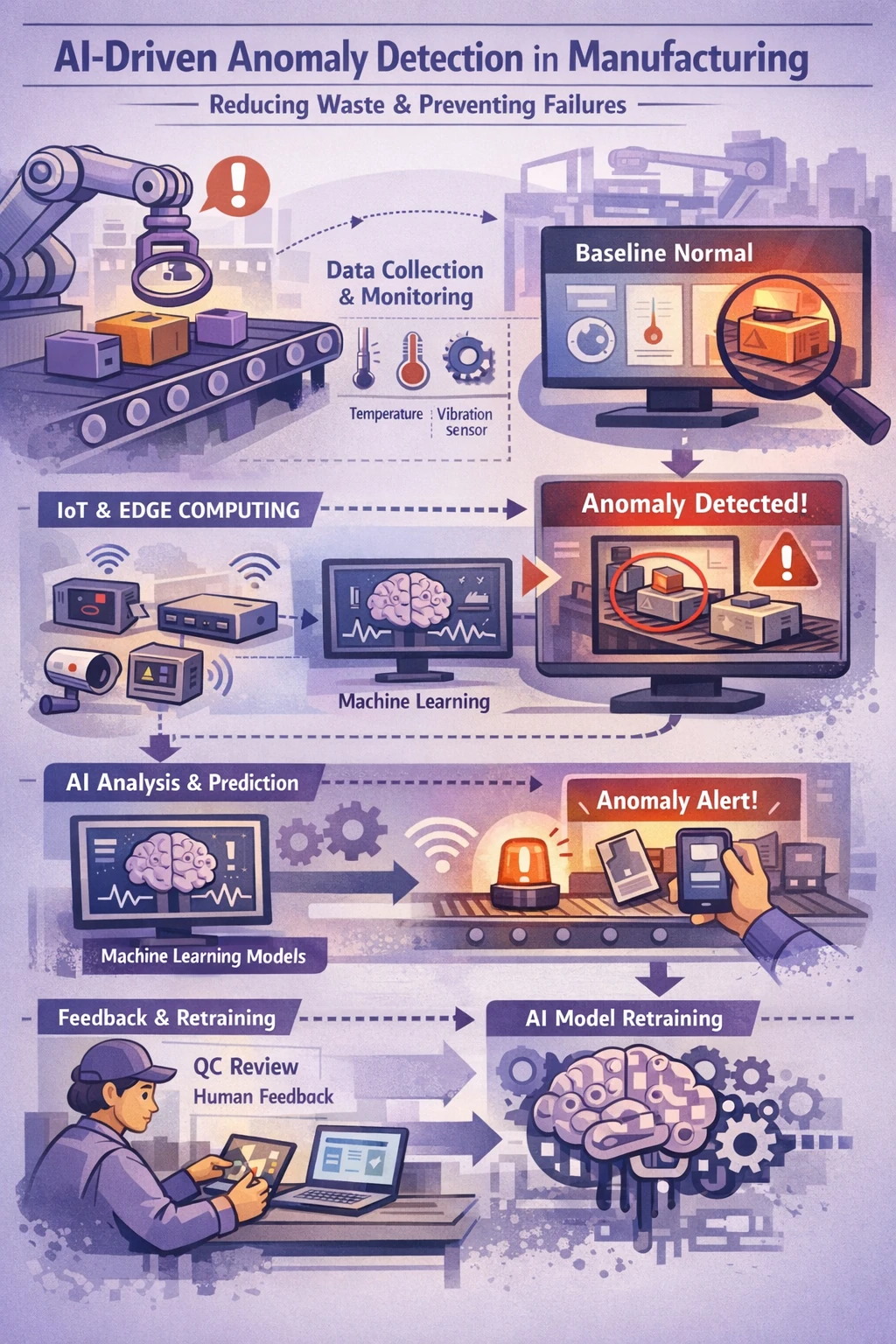
Illustrated diagram showing an AI-driven anomaly detection workflow in manufacturing, where sensors collect temperature and vibration data from production equipment, edge devices and machine learning models establish a normal baseline, anomalies are detected and flagged on monitoring screens, alerts are sent to operators, and human feedback is used to retrain AI models to reduce waste and prevent equipment failures.

What is Proactive Anomaly Detection in Manufacturing?

Proactive anomaly detection in manufacturing is the use of AI and ML to analyze your real-time sensor and production data, using that data to train and create a baseline to search for anomalies that deviate away from the “normal” baseline.

By identifying oddities and deviations, you can prevent anomalies from turning into losses, downtime, or waste. This in turn increases your overall productivity and improves your resource use.

But to ensure your AI performs its proactive anomaly detection properly, you’ll want to understand how AI is trained to find anomalies and alert its users.

How AI, IoT, and Edge Computing Enable Real-Time Anomaly Detection

Proactive anomaly detection in manufacturing follows a structured workflow that allows AI systems to identify deviations in real time and prevent failures, waste, and downtime.

Proactive Anomaly Detection Workflow

  • Data Collection
  • Baseline Normal Behavior
  • Real-Time Monitoring
  • Anomaly Identification
  • Proactive Alerts and Notifications

The workflow outlined above is executed through a combination of AI models, IoT sensor networks, and edge computing infrastructure.

Data collection is done through IoT sensors, high-resolution cameras (computer vision), machine logs, and SCADA (Supervisory Control and Data Acquisition) systems. These devices gather real-time data from machinery and production lines and transmit it to local edge computing devices located on the factory floor.

At the edge, this data is cleaned, filtered, and normalized to remove noise and prepare it for analysis. This preprocessing ensures that only high-quality, relevant data is passed to AI and ML models.

Using this data, AI models develop a baseline of “normal” behavior by analyzing large volumes of historical and real-time data. This baseline creates a dynamic profile of expected performance across machines, processes, and workflows.

During real-time monitoring, AI continuously compares live data streams against the learned baseline. When a data point or pattern deviates beyond acceptable thresholds, the system flags it as an anomaly.

ML models such as autoencoders, LSTM neural networks, and isolation forests are commonly used to detect complex patterns and deviations in sensor and time-series data. For image-based defect detection on assembly lines, deep learning models such as Convolutional Neural Networks (CNNs) are used to identify visual anomalies and quality defects.

When an anomaly is detected, the system can issue proactive alerts and notifications containing contextual information about the issue. In some cases, the AI may also trigger automated actions such as scheduling maintenance, adjusting a process, stopping a machine, or initiating a quality check.

Because this analysis occurs on edge devices close to the source of the data, response times are significantly faster than cloud-only approaches. This low-latency processing allows manufacturers to detect and address issues before they escalate into equipment failure, downtime, or waste.

Optionally, anomaly data can be sent to the cloud for long-term storage, deeper analysis, and model retraining, supporting continuous improvement of the AI system over time.

Real-World Case Study Examples

Real-world case study examples of AI being used for proactive anomaly detection can be found in the companies of Siemens and Bosch and their manufacturing innovations:

Siemens

In a 2025 report from Arm Newsroom, Siemens utilized real-time edge AI to give predictive maintenance an upgrade by cutting down on latency and trading periodic sensor readings found in conventional systems with the real-time analysis provided by embedded edge AI.

Using Armv9-based AI-powered sensors, Siemens was able to “continuously monitor vibration patterns, temperature fluctuations, and energy draw in motors, conveyors, and actuators”. What’s more, whenever their system detected an anomaly, “it doesn’t just send an alert. It can automatically adjust machine parameters in real time”.

Bosch

In a 2023 report by Bosch, the company detailed how one of their plants in Bavaria was using AI for quality control. At their Immenstadt site, their AI was trained to search for defects in components for ABS systems. Anytime a defect was detected, the test bench’s screen would light up red to alert assembly workers of the anomaly detection. The AI continuously improves through weekly retraining.

Now you know how AI is being applied for proactive anomaly detection in today’s world. But none of this would be possible without two crucial components: sensors for gathering data and quality data for your AI system.

Why Are Data Quality and Sensors Crucial for Supporting AI?

Data quality will be what determines how well your AI can perform, and high-quality sensors will be necessary to gather the proper data to feed your AI.

To achieve high-quality data, your organization should have consistent logging, established data pipelines, and high-resolution sensors that are well-calibrated. Good data must be clean, diverse, and relevant. This helps create a more reliable, stable, and unbiased model—this is essential, especially when you’re trying to detect anomalies and avoid waste and machine failure.

If you have poor quality data, outdated sensors, or inconsistent logging, your AI will suffer in performance as its conclusions become flawed, and it will lead to missed anomalies, quality issues, unanticipated failures, and wastage.

Even when your AI is performing well, it can always get better. That’s why AI models require retraining and feedback loops to maintain optimization.

How Do Feedback Loops and Retraining Keep AI Optimized?

Feedback loops and retraining keep AI optimized in two stages:

  • Feedback loops serve to gather data that is verified by a human
  • Retraining serves to integrate the verified data gathered from the feedback loops to update the AI model

Feedback Loops

Feedback loops work through cooperation between AI and a human reviewer. Whenever the AI flags an anomaly, a human, such as a quality control engineer, will check to verify the result and confirm if the defect is true or if there was a false positive/negative scenario. The quality expert can then correct the AI’s decision if needed. If corrections are necessary, the human staff can provide accurately labeled data as input to keep the AI grounded and true.

Retraining

Retraining is a continual process where the information gathered from the feedback loop is incorporated into the AI. This helps the AI adapt to model drift and changes to your manufacturing processes. It also aids your AI in learning of new types of defects to look out for. Finally, retraining serves to optimize the AI and prevent bias from emerging.

Through continuous improvement, your AI-enhanced anomaly detection protects your manufacturing from defects and oddities, even as manufacturing processes evolve and new types of anomaly-related issues arise. It is crucial to maintain this cycle of improvement for your AI to be a success.

Make Your Manufacturing More Efficient With AI

As you can see, leveraging AI for proactive anomaly detection protects against more than just wastage from defects and overproduction scrap—it makes your manufacturing more efficient! AI-powered anomaly detection empowers your manufacturing teams to make faster decisions, be proactive in maintenance, and save time from unplanned downtimes, stoppages, and micro-inefficiencies that would otherwise be hard to notice.

To ensure your AI for proactive anomaly detection is made to fit your unique manufacturing workflows and processes, consider enlisting the services of a custom AI developer like The Provato Group. Our AI development expertise can be applied to any part of your manufacturing organization, from your office to your factory floor.
The Key to Smooth Data Migration: Avoid These Common Data Migration Mistakes

The heart of a business is in its infrastructure, and infrastructure evolves. When that happens, data must be migrated from one system to the next. The company’s entire history is stored in your data – ready for data analysis, audits, and sometimes records of decades-long customer relationships. Some businesses went through their digital transformation so long ago that they once digitized the film from tapes. Some remember the migration from mainframes to modern PCs and servers. A great many have now migrated from PCs and servers to the cloud.

More businesses every day are going through complete and partial data migrations. One department may migrate to upgrade its platform of tools, or the company may migrate archives and infrastructure away from technology that has grown archaic to the next cutting-edge solution. However, if this is your first major data migration, there are more than a few ways to invite disaster.

Data migration is a huge task with millions of opportunities for error. If done carelessly, you get technical difficulties of the highest order. If done neatly and meticulously, your staff is left with the delight of a new system with their archive of data already at their fingertips.

Let’s explore some of the most common data migration mistakes and how your team can easily avoid them.

1) Migrating into a Mystery System

Know your system before you migrate into it. Have key staff members spend time exploring the new platform, creating test cases and getting to know the features. The data won’t be at anyone’s fingertips if your team doesn’t know how to access it.

Both your IT team handling the migration and those who will most use the platform afterward should explore the features, functions, and what it’s like to handle data in the system before the migration. This will not only help you plan a better data migration, but it will also help your teams more quickly adapt to the system once migrated.

2) Migrating At the Wrong Time

There are times when a company can soak a little disruption, and times when it can’t. Planning a data migration is a lot like planning an office renovation. Copying and moving files takes resources, and it may leave certain teams in a data limbo while their files and systems are being transferred. Even if you plan for your teams to keep using the old system while the new one is prepared, the transfer itself or the resource usage can cause errors in the system.

You want to schedule a data migration for nights, weekends, and slow weeks in your business cycle. Nights and weekends allow you to optimize resources for the migration and work in a clean, unchanging data environment between the two systems. Planning for a slow week ensures that any aberrations that could occur during data migration have the minimum impact on your team and operations.

3) Migrating Your Junk Files

When relocating offices or moving between homes, you don’t bring crates of old junk mail – but businesses often migrate their entire file systems without culling the junk.

Why use your resources and effort on migrating files you don’t need? This is the perfect opportunity to remove all junk mail, old temporary files, programs you don’t need, intermediate backups, and miscellaneous downloads. Every email spam folder can be removed. Wipe out any program not serving a function – and all the data attached to it. Take this opportunity to purge your email lists, and archive old customer and employee data. A data migration is the best moment to lean down your data, shedding junk and potentially culling old malware along the way.

4) Skipping the Prep of Both Files and Destination

Removing junk is an example of preparing your company’s data for migration. But just one step. In any migration, both the data and the target platform should be prepared to combine. Your data may need to be adapted to fit the new formats of the new system. For example, a new system might use a different date format, or have more and different names for certain shared variables. Preparing your data allows a smoother automated transition of large bodies of data and full system configurations.

Preparing your file destination allows you to get all your security and operational settings in place before errors can be caused when the body of legacy data is imported. Make sure you’re using the right database types, and that your built-in passwords match (or are updated altogether). Preparing both the data and the new platform will help to minimize hiccups in the new system and prevent data disasters.

5) Forgetting to Test Migration Success

Speaking of data disasters, always test a theory before implementing it. Testing data migration at every step of the process is essential when considering something as important as your business’s operational infrastructure.

Test to ensure that:

  • The method you will use to migrate data works.
  • The data functions correctly in the new platform after being migrated
  • Migrating large sets of data is successful
  • Migrating more than one category and nested file systems is successful
  • Outlier cases are handled
  • Data at no point is lost or corrupted during the migration

6) Roughly Estimating the Migration Time and Cost

You might be surprised to learn how often a data migration estimate is really a rough “guestimate” with no real understanding of data file sizes, transfer speeds, and the available hours to operate the transfer. This is one of the reaons that a trained data migration specialist is often consulted to build a data migration plan that includes a more accurate and data-based estimate of the cost requirements for a data migration.

After calculating the size of your data migration, the originating and target systems, and the transfer speeds available, your data migration specialist will be able to give a more accurate estimate of the hours needed to complete the migration. From there, you can build a schedule of transfers and data handling during low-activity hours for your company systems.

7) Migrating Manually without Automation

Modern data migrations are massive. There are thousands, hundreds of thousands, and millions of data entries depending on how busy your company is. Most of this data, however, is already organized into classes and similar-set databases that can be automatically migrated far more easily than you could manually migrate – even for those savvy in handling servers.

Automated data migration takes the best migration process and then iterates over your full data set. In this way, you can carefully insert the data from an old system to a new system – even with unmatching data forms – in order to migrate company data without manual entries and hand-selected transfers.

8) Forgetting to Test the Migration’s Complete Success

The other side of the automation coin is the need for human auditing and testing. Your automation may not be able to handle outlier test cases, or some of the transfers may have simply been interrupted or incomplete due to signal variance from your internet provider or router. Check everything.

Make sure that a complete data migration is also fully operational. Asl your testers or even your teams to explore, try to touch and access all their operational data, and report back. Your migration software may have also produced a log of errors and alerts that can guide you toward potential areas where an error may have occurred, or where minor data corrections may be necessary.

9) Data Migration Without an Expert Plan

All of these common mistakes are why the most organized, efficient, and error-resistant data migrations come from consulting with a specialist. Data migrations are both large-scale and extremely precise. Every piece of data matters, and every migration from one system to the next is unique. It takes forward planning and an eagle-eye perspective on the entire system to plan the most efficient data migration for both the company and the data itself.

You can rely on The Provato Group as your data migration specialists to plan and implement the smoothest possible upgrade of your company’s infrastructure.

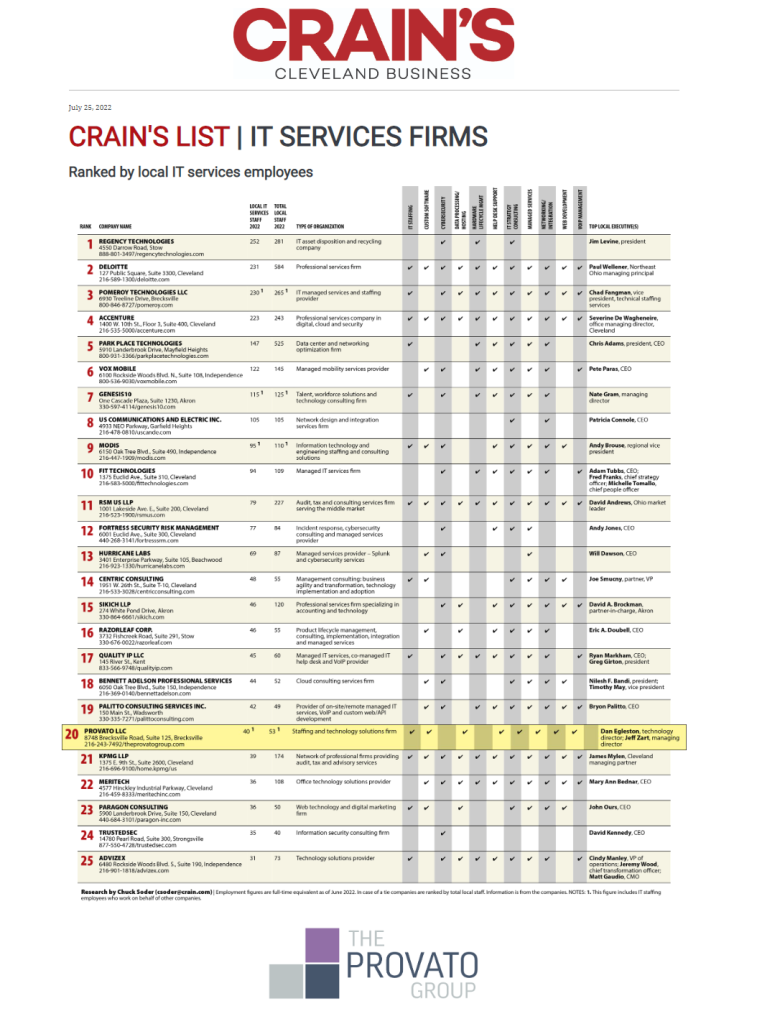
The Provato Group Named as one of Crain’s Top IT Services Firms

We’d like to take some time and celebrate the recent news that we’ve been named as one of Crain’s Top IT Service Firms. For over 40 years Crain’s Cleveland Business has been the trusted source for business news and information for Northeast Ohio’s top executives and business owners. Being named to this list not only shows our dedication to hiring the best local talent, but also speaks to the growth we’ve experienced in the last few years.

“It’s rewarding to see that our dedicated focus on helping our customers successfully grow their business is reflected in the growth of our company“, said Managing Director Jeff Zart.

We appreciate the acknowledgement from Crain’s and look forward to continuing servicing our clients and supporting our partners with the top notch services we’re becoming known for.  

Image of Crain's List of Top IT Services Firm

A Short History of Cloud Computing and Its Future

We use cloud computing on a daily basis and think nothing of it. Opening a thin client on our smartphone we instantly access the cloud when saving the document we created or opened. In fact, the process of saving happens automatically, too.

In the Beginning DARPA Created the Internet

Most of us alive and using computers or smartphones today grew up with computers and smartphones. The older people using these devices recall their invention or popularization – all ultimately stemming from the Defense Advanced Research Projects Agency (DARPA) project called ARPANET in the 1950s and 1960s.

The Personal Computer Revolutionized Individual Development

While computers took decades to go from the mainframes of that glutted businesses and research universities beginning in the 1950s, once the personal computer hit the shelves in the late 1970s, technology leaped ahead quickly. Many companies flooded the market with their version of the personal computer. You could choose from the Micral C (1977), TRS-80 (1977), or Commodore PET (1977), soon followed by the IBM Personal Computer 5150 in 1981 and IBM’s Personal Computer 5150 in 1981. The easier-to-use Macintosh computer entered the fray in 1984.

Berners-Lee Creates the World Wide Web from the Internet

It took only 12 years from the introduction of the personal computer for the invention of the World Wide Web (WWW) in 1989 by Tim Berners-Lee to occur. While DARPA’s packet-sharing idea lets researchers around the world communicate and share data, Berners-Lee worked to bring the utility of ARPANET to the masses. His WWW let any individual or organization with server space create a web page.

This revolutionary idea spawned businesses and special interest pages. The browser wars ensued with Netscape duking it out with Mosaic, Internet Explorer, and Lynx, the latter a text-only browser that only individuals with very slow connections used. We’re talking a 2400 baud modem because no one conceived of 5G or broadband at the time.

Businesses and Entrepreneurs Flood the WWW

The WWW quickly welcomed businesses, including unique notions like eBay (1995) and Amazon (1994). Both companies allowed an individual to create a listing to sell an item or items via the larger platform but under their own personal or business name. Both eBay and Amazon offered their own built-in shopping cart and a systematic point-and-click mechanism for creating listings. This qualifies both as the first service platforms. They enabled the birth of the entrepreneur in all of us and inspired the creation of platforms like TheRealReal, thredUP, Poshmark, and many others. Etsy comes from this idea, as does Shopify.

1999 Gives Birth to the First SaaS App

While most of us think of cloud computing as personal computing, the first cloud services served businesses and those individuals wanting to enter sales on a personal basis. Even the first credited cloud app, Salesforce, serves businesses.

With respect to personal or home computing, the cloud app revolution began with sites like GeoCities and AOL offering up free server space so people could create websites on any topic. Some people realized that they could upload any file to their server space, then access it at a friend’s home from their computer.

Another trick – emailing it to yourself or creating a draft with an attachment – went on for years. You could purchase space, too, from CompuServe, AOL, and eventually GeoCities, or obtain a free Yahoo email address that let you store your email online. We didn’t call it “in the cloud” at that time, but that’s what we call it today.

21st SaaS Offers Mobile Solutions

Around 2006 to 2007 an upstart called Google offered free email to compete with Hotmail and Yahoo. It also offered a unique app called Docs, which still exists. Traversing to the Google Docs website, the user can log into a word processing app that works similar to Microsoft Word and Corel WordPerfect. The popularity of Docs spawned online versions of spreadsheets programs, databases, drawing programs, and more. Competitors, such as Zoho (1996), had existed for longer, but Google used better marketing and offered an easier-to-use interface.

SaaS and Its -aaS Siblings Become Ubiquitous

Suddenly, it seemed, every business made an app and offered “a cloud solution.” True cloud solutions though require more than an app. They allow you to save your work in an online space you can access from anywhere. Most of us use a cloud app each day, perhaps without realizing it.

We open a word processor like Microsoft Word or Google Docs from a computer and it instantly connects to the cloud space connected to the account. While we once felt awed at the gift of a few free KBs of storage, companies now dole out 15 MG to a gigabyte (GB) without thinking about it. Since we can purchase a physical terabyte drive in a store or its virtual representation for less than $100, we’ve beat what many once termed “the storage problem.” Cloud computing lets us store what we need in an accessible anywhere mode.

According to DevSquad, 94 percent of technical professionals use cloud software as a service (SaaS). That shouldn’t surprise anyone. You expect computer gurus to use the latest and greatest inventions. Look at the top 75 SaaS apps as ranked by Datamation though and you learn that the most popular app falls into the marketing industry – Salesforce. One of the original SaaS apps still tops the list, followed by Microsoft Office 365, an app used for both personal and business use. Embracing personal creativity hits the list at number three with Adobe Creative Cloud because you have to edit selfies sometimes. Business use cases abound with the top five rounded out with FreshBooks accounting SaaS and Paychex, a payroll and human resources cloud app.

The ‘as a Service’ Revolution Continues

Today, cloud computing provides the online app plus a thin client that takes up only a few megabytes on our smartphone or mobile device. Those old enough to have installed a program from a collection of floppy disks or even a CD-ROM appreciate the simplicity of the cloud. It turned what once required a veritable computer genius into something children learn in pre-school. Most of us can and do use the cloud every day when we access SaaS. Even if we don’t use its more advanced forms, such as platform as a service (PaaS), Framework as a Service (FaaS), Operations as a Service (OaaS), or any of the other more than 20 and growing “as a Service” options described in the Auvik dictionary. We can appreciate how far computer science has come and its burgeoning future in the Metaverse, Internet of Things (IoT), blockchain, artificial intelligence, machine learning, and other developing technologies.

7 Best Practices for iOS App Development

Developing a successful iOS application isn’t easy. It requires forethought, planning, and a commitment to quality. Your strategy and approach may vary depending on what kind of app and audience you have, but there are some guidelines you can adhere to no matter what kind of app you’re creating.

Let’s take a closer look at seven best practices for iOS app development.

Do your market research

Before you start coding, it’s important to have done extensive market research. This will help you better understand your customers and the need for your app. Without this important first step, you run the risk of your app failing to resonate, making it more difficult to grow and sustain your user base.

Have the right understanding of who your app is for and what pain points it solves. This will lead to happier users later, along with more frequent adoption and use.

Define your Minimum Viable Product

Yes, you should do your due diligence and perform the necessary research to ensure there’s the right product-market fit for your app. But you’ll also want to deliver value to your customers as quickly as possible.

When you’re starting out, you’ll want to identify a Minimum Viable Product, or MVP. This is the application you can offer to a smaller subset of customers with the least amount of features they’d need to derive value out of using it. They can test it and provide valuable feedback on what needs to be fixed.

Your MVP doesn’t represent the final form your app’s going to take. Think of it as an extension of your research efforts. By identifying an MVP and testing it with a small cadre of users, you’ll then be able to better pinpoint any challenges your app may face. You can then fix them without having to do so after you’ve deployed them.

Take your time to ensure your code is on point

When you eventually submit your app to the App Store, you’ll want to be sure it gets through without issues or delay. You may feel pressure to get your app to market as quickly as possible. But taking the time to review your code to ensure it’s high quality solves a lot of problems you’ll run into after release if it’s bad code.

This means having a robust system of quality assurance throughout your organization – whether you’re a one-person shop or a team of developers. Quality code is the backbone of all successful apps.

Look at documentation as a part of the process, not an extra task

Documentation often seems like a bore and a chore. We can view it as an additional task after we’ve completed all the truly critical work that needs to be done.

Don’t fall into this trap! Documentation, at every step of your iOS app development process, is vital for creating a better overall user experience.

For one, documentation helps your users understand what your app is and what it does. Documenting your code is also useful for helping your developers both now and in the future. When improvements or changes need to be made, documentation serves as a source of truth for helping you get back on track.

While you may like your developer team at the moment, there’s no guarantee they’ll stay forever (in fact, your developers are almost certain to change at some point). Having proper documentation helps maintain institutional knowledge between your teams.

If you don’t have additional developers and work on the project yourself, this makes documentation even more important. Don’t let one person (namely: you) become the single point of failure.

Always keep app security at top of mind

App security is another critical component of the iOS app development process. Consider the consequences of releasing an app with faulty security in place. If a malicious actor hacks into your app’s data, they may then be able to hack the data of any device that has used your app. That data could include personally identifiable information (PII) or financial information like credit card numbers or bank statements.

If your customers have their data exposed and stolen, they won’t be happy – and for good reason. Beyond eroding their trust in you as a product or service provider, you may also be exposed to potential legal action.

Sound security practices using features like encryption and multi-factor authentication – help keep your users and their information secure. This requires attention to detail when coding to minimize vulnerabilities. It may take more work and oversight upfront, but it’s much easier (and less costly) than taking shortcuts that lead to bigger headaches later on.

Distribute it via the right channels

Research is important. Correct code is important. Security is important. These are vital steps to make your app a success. But just as critical as these components is your ability to get your app in front of the right people. You do this by distributing it through the right channels.

Don’t overthink this step. When you’re developing an iOS app, the best place to distribute it is via the App Store. Apple has a set of comprehensive guidelines for app developers to follow when submitting their apps. These guidelines cover just about every aspect of app management you can think of, addressing everything from performance to legal concerns.

Review these guidelines before you start creating your application. Ensure that you’re adhering to them at each stage of the development process – through planning, development, and deployment. If you don’t, you may have to fix these issues later. That will take additional time and money, potentially delaying your app’s release or causing you to pause operations.

Optimize backward compatibility

Your iOS application shouldn’t just run on devices or systems built in 2022. Not all of your users are going to be on the most current iPhone or operating system. You’ll want to ensure you can appeal to the broadest number of users possible.

That’s where backward compatibility enters the equation.  Backward compatibility is when an app can run on earlier versions of iOS and Apple devices like the iPhone.

Your ability to optimize this will depend on your app’s specific features and how well they match up with previous iOS versions. In some cases, you may not be able to do this for older versions. But maintaining awareness of earlier versions and being compatible with them when possible will help increase your potential users.

Need assistance navigating your iOS app development? The Provato Group can help. For more on how we can partner with you, contact us today.

5 Reasons Why Sitefinity is the Right CMS For You

Developing engaging content is a surefire way to reach more customers. But simply writing it isn’t enough. Great content doesn’t occur in a vacuum. Whether it’s the planning process before you’ve developed your content or the distribution process after, your content will require strategic management to ensure it’s performing well and helping you drive more sales.

Because of this, you’ll want to partner with a content management system (CMS) that allows you to get the most out of your content. Your CMS should be feature-laden, delivering value in a way that works for your organization’s specific content needs. It should have the capabilities needed to develop, distribute, and measure the content you pour your heart and soul into creating.

The best CMS you can use is Sitefinity CMS. It’s a comprehensive CMS that works for organizations large and small – no matter what your customization needs are, Sitefinity CMS can help you optimize your content’s performance. Let’s take a closer look at the top five reasons why you should use Sitefinity as your CMS.

Customization

Developing content is about more than simply thinking of a great idea and then executing it. You must be sure that your message is going to the right audience at the right time. Without this knowledge in mind, you run the risk of delivering carefully crafted content to people who aren’t really interested in what you have to offer. Sitefinity’s customization capabilities allow you to find your audience.

Sitefinity’s content development suite includes the ability to customize your content or campaign for the appropriate audience. You can not only develop content directed in the right place, but you can also test it out to optimize its effectiveness. Sitefinity CMS offers sophisticated A/B testing capabilities. You can evolve your content, shifting your focus until you strike a balance that resonates.

When you customize your content, you’ll get more value out of the valuable audience research you’ve conducted. You’ll develop messaging that speaks to your prospects on their level, no matter what demographic they fall under. This is how you increase engagement – with content expertly aimed at the right person.

One of the best ways to evaluate the distinctive components of your audience is through segmentation. Sitefinity gives you the ability to select the categories by which you want to identify your audience. This can be based on their demographic information or on their activity with your website. With the Sitefinity Insight campaigns feature, you can examine your potential customer’s activity and makeup. Once you’ve identified your audience, you can then begin personalizing your site content to best meet each segment’s information needs.

All your customization efforts will be recorded and evaluated by Sitefinity Insight, providing you with valuable insight into what’s working and what isn’t. You’ll find yourself able to continue successful campaigns or pivot from ones that aren’t having the expected impact.

Of course, customization is only effective when you fully understand your customers.

Learn More About Your Ideal Customer

Having insight into your customer and their behavior is one of the most powerful tools you can have in your marketing toolbox. Sitefinity has numerous tools dedicated to helping you better understand your customer. With its automation and customer relationship management (CRM) capabilities, Sitefinity helps you establish a holistic view of your customer and their wants, needs, and desires.

You can integrate information and data from other programs (more on this below) to help you build powerful, accurate customer personas. This provides you with an informed background from which to build compelling content. Sitefinity CMS understands that knowledge of your customer is the most powerful knowledge of all and gives you the tools needed to figure them out.

So how can you apply this improved knowledge of your customer and leverage it across platforms?

Integration

You likely use different platforms for a variety of business reasons. You’ll want to align your content with the goals these platforms are supporting. Being able to do this can be the difference between streamlining your content with the rest of your operations and allowing your organization to fall into confusion from a content development perspective. Having multiple tools can leave you reaching for data from disparate locations, hurting your ability to create content that takes these platforms into account.

You won’t have to worry about this with Sitefinity. That’s because Sitefinity has advanced integration capabilities with a variety of platforms that businesses love to use.

If you have an existing customer relationship management (CRM) tool with valuable customer data you need to access, Sitefinity can connect with it.

What about your employee records? If you have internal-facing content to create, having the ability to reach that information might be helpful. Sitefinity can integrate with those types of platforms as well.

There’s no shortage of integration capabilities at your disposal when you partner with Sitefinity. You’ll find that it’s a versatile tool with a seemingly limitless number of integration possibilities. Your marketing staff can get quick access to the data from those platforms while disseminating content from your website to those platforms as well.

Sitefinity encourages digital unity by linking your various platforms to it. Whatever your specific business needs – and whatever your current toolset – Sitefinity can help you manage it without the fear of losing valuable data.

Your need to integrate is only one concern, though. You’ll also want to develop websites that look stunning no matter how your customer is viewing them.

Responsiveness

Your potential customers will likely be accessing your site on several different devices of varying sizes – smartphones, computers, and others. Sitefinity’s responsive design adapts your site to the device its own. You won’t have to worry about how your site appears on one device compared to another because Sitefinity has the flexibility needed to make it look perfect anywhere.

This responsiveness tracks with the platform’s overall theme of simplicity – one that is present within the platform’s operating features.

Easy to Use

No matter what kind of platform you’re looking to use for any purpose, usability is critical. When a platform is difficult to navigate, it makes it harder for your team members every time they log in. They’ll waste time trying to find where content is stored and the specific commands they need. It will be even harder.

With Sitefinity CMS, you’ll never have to worry about your team’s ability to use the system. Sitefinity’s efficient user interface is geared toward simplicity and ease of use. Sitefinity condenses all the tasks you’ll need to develop and distribute content that’s easy for your intended audience to use. With a few clicks, you’ll be able to create content, guide it through production, and send it to the appropriate channels. The simple interface enables you to deliver consistent language and content through whatever device you choose.

The bottom line? Sitefinity CMS is one of the best CMS tools available from both a versatility and capability standpoint. Using it will help your marketing team level up its content for happier customers and better results.

Bootstrap 101: What it is and how to use it

You may know a bootstrap as something located on the back of a shoe or boot. You may even know it from the common expression to “pull yourself up by the bootstrap!” It represents the idea of creating for and providing for yourself, making something out of nothing.

The idea of “bootstrapping” is about starting small and creating something much bigger with only your own efforts and little advantages.

Of course, this has an entirely different meaning in the digital realm. When it comes to computers and electronic devices, the term bootstrap refers to the ability to “boot” a program onto a device with the help of a smaller program. This facilitates the larger program being integrated typically in an operating system.

So, while a bootstrap is a tiny part of a boot used for lifting it up, from a computer perspective, Bootstrap is a much different entity. Let’s take a closer look at Bootstrap by defining what it is, its impact on the technology world, how you can use Bootstrap, and what its continued use means for the future.

What is Bootstrap?

Two Twitter developers named Jacob Thornton and Mark Otto developed Bootstrap while at the social media platform. They created it to make the tools used on Twitter perform more reliably while also cutting down on the time needed to maintain those tools. Initially, the tool itself was known as Twitter Blueprint while often being referred to as Twitter Bootstrap.

Here’s what it is: a software that provides a front-end development framework for creating websites and applications that support websites. It’s free to use and available for all, open-source. Bootstrap was manifested using HTML, CSS, and JavaScript to support its functions. The apps it creates are mobile-focused.

Now that you understand what Bootstrap is, let’s dive into what it means to the technology world – and specifically, those looking to develop websites without unlimited financial resources to throw at the problem.

What Bootstrap means to the technology world

The main benefit of using Bootstrap is that it’s equally valuable to experienced developers and beginners. It facilitates easy website building and design without forcing the user to enter commands.

Bootstrap taps into sound design principles to give anyone engaging with it an optimal user experience. It has a responsive layout, which means that the website or app can look it gives the viewer based on the viewer’s specific orientation. Because it’s mobile-first software, it operates with the assumption that all users will be using a tablet or smartphone.

It’s this responsiveness that makes Bootstrap an effective tool. It makes this the perfect solution for organizations with staff that work primarily on mobile applications. They no longer must worry about changing dimensions on the device – Bootstrap adapts depending on the situation.

Along with its intuitive design, Bootstrap also offers plenty of valuable user interface components. It delivers an implementation framework that will leave users able to easily begin using it. It also offers source code, or the program can be compiled in advance, depending on the user’s needs.

One of the biggest advantages of Bootstrap is that along with being open source, it’s also free to use. Anyone who wants to use it can find it hosted on GitHub and can download it from the official Bootstrap website.

It’s clear why Bootstrap is such an invaluable tool for so many developers working in the mobile space. But what exactly can they use it for, and why should they use Bootstrap?

How and why you should use Bootstrap

The primary use of Bootstrap is simple: if you’re looking to develop a mobile-based application, it’s an inexpensive yet comprehensive option. Bootstrap’s functionality eliminates the need to write endless amounts of CSS code. This frees up your availability for other tasks.

There are multiple reasons why you should consider using Bootstrap. As noted above, its responsiveness is a major selling point. It comes with a prefilled grid, meaning you can load content directly into your containers.

It also comes with handy components that you can integrate into your website design. You can add navigation bars, dropdown menus, or thumbnail images. These aren’t the only components you can add, of course, but just a small sample of what’s possible.

Because of the responsive design, you’ll be able to add a wide variety of components that resize to fit your site. You won’t have to grapple with sizing the components yourself – Bootstrap takes care of that for you, again leaving you free to focus your mental energy elsewhere.

Bootstrap also has shockingly thorough and easy-to-grasp documentation. No matter what you need to do through the software, you’ll be able to find documentation to help guide you through the process. There’s nothing more frustrating than being stuck with software and having no idea how to implement it. Bootstrap’s documentation provides plenty of code samples, making complicated moves easy even for novices.

Because it runs using JavaScript, Bootstrap also provides multiple plugins from JQuery. They have an entire catalog of plugins you can insert into your site. They offer everything from pop ups to image carousels.

The bottom line is that Bootstrap is simple to use and compatible with most browsers. Using it for mobile application development is a slam dunk. But what’s the future of this tool?

The future of Bootstrap and determining if its right for your team

So, should you use Bootstrap? It’s certainly not without its drawbacks. It’s easy to use, but users will need to familiarize themselves with it and get used to its interface.

No matter what type of front-end web development you’re working on, Bootstrap likely offers the solutions and capabilities you’ll need. It has a versatile set of tools with plenty of educational resources within the program itself for anyone who needs to get acclimated.

Yes, it’s not perfect – no web development tool is – but the design flexibility it offers you is hard to beat. And as a free service, you certainly can’t beat the price.

How to Write Compelling Blog Posts that Your Audience Wants to Read

Writing a great professional blog is a balancing act. Without traffic, SEO and most of all, reader interest your blog will never be read and even your most passionate and expert writing will go unnoticed. This is the one thing that many aspiring writers struggle with, especially in the growing blog industry. You can write for your brand and you can write for your SEO rate, but can you write for the audience?

How do you write blog posts that people actually want to read? As a writer, you can create compelling and expert content. You can process facts into reports and explain the steps of a process. But how do you write article after article that compels readers to come read even months after publication? Much less ensure that content supports your business or brand’s conversion funnel goals. To do this, you need to balance the three elements that make a great blog.

The Triforce of Blogging:

  1. SEO Potential
    1. When it comes to great blogging, you have three driving goals. The first is to appear on search engine results. You can call this SEO or inbound marketing; they are the same. You are writing for the web crawler bots that report the structure and content of each website to Google.
  2. Reader Interest
    1. The second is to draw traffic based on user interest. Your potential readers and customers need to be looking for the keywords you optimize and – more than that – they need to care about what you’ve written and find your work valuable. Without reader interest, there is no traffic for your keywords and no readers for your great content.
  3. Personal Expertise
    1. Finally, you are trying to write on things you know and are interested in. Work your expertise into your writing and incorporate the expertise of others in your brand. Or learn something new and share your discovery with the audience. Convey your passion, enthusiasm, and knowledge depth in a topic and your readers will be along for the ride.

You will need to balance all three of these elements to write a great blog post. You can hone your SEO. You can become a great expert. But what about the readers? Let’s zoom in on reader interest.

Knowing Your Audience: How to Know What Readers Want

Writing an article that someone wants to read is about knowing your audience. There are two ways to do this: programmatically and intuitively. You should definitely try both.

First, let’s start with intuition. It will give you a framework for understanding your readers.

Who Are Your Readers?

Your blog readers will, ideally, be people interested in your brand. If you are blogging for a company, consider who your potential customers are. For example, a hardware store is writing for their local community, and especially those DIY handypersons who swing by for new drill bits regularly. A brand of baby food, however, would have an audience of almost 100% parents of very small children.

Are you an industry technician? A lifestyle guru? An interview host? Determine what your message is to identify who you’re writing for.

Create Reader Personas

Then imagine your readers. Visualize the kind of people who might read your blog. What can they gain from your content? What might they need from your brand? Think about the lives they live and why they would be interested. Make your readers into people in your mind and, when planning your blog, you will have a better idea of what your readers want to see.

Imagine the handy neighbor looking up what size drill bit they need for their deck. Imagine the mother of a fussy baby looking for answers online. These are your audience. What would they want to read?

Where is the Traffic?

The other side of the coin is to look at where people go en-masse. There are several online tools that will help you break down the keywords in any topic or industry, then see just how many people are searching for each thing. Some keywords, though they fit the SEO formula, are much less-searched than others.

You can break up your traffic analysis into search frequency and hit frequency. What do people search for most? What sites do they click on most? Determine this to build a picture of where the numeric interest lies in your industry and niche. We spend a lot of time working with our manufacturing web design clients on this in particular.

Combine the Two

Now take your data and your intuition and combine them. Ascribe the questions you saw top the charts to the people you know are behind search queries. Is your DIY customer also searching for bird feed with equal enthusiasm? Probably. Now you’re imagining someone building a deck to watch the backyard birds. 

Providing Value to Your Readers

If you did have a following of readers who were reading every new post, what are they getting out of it?

You will want to build a plan based on why your readers are looking for content and reading through blogs in the first place. Traffic doesn’t just happen. It’s not a number everyone gets for publishing. Each ping of traffic is a real human who is searching for and reading blogs for a reason. What value does your blog offer readers? Why are they reading to the end and, if they come back, what do they gain from reading your series?

It doesn’t have to be profound. Sell yoga classes, or pants? Share a lifestyle blog with a blend of smoothie recipes, yoga guides, and stress management tips. Now you are a source of advice for yoga participants. Repair appliances? Create a blog of appliance repair guides and before-you-call troubleshooting tips.

Map Your Content

Take everything you have learned and use it to build your content map. The trifecta of great topics are those with good SEO potential, high statistical traffic, and are topics you can write your best with expertise in your industry or the passion of an industry leader – or both. Your personal interest in the topic will determine how powerful it is, and the depth of information you can convey.

Consider blog series that explain an interesting set of facts or guides. Consider a series of interviews with team members or industry leaders. Blogs are often blended with a little ‘lifestyle’ as well – lighthearted pieces that pack an SEO punch.

So how do you write blog articles that your audience really wants to read? How do you choose topics that earn SERP and attract clicks, then write compelling content that readers come back to read again? It all comes down to understanding your audience and respecting the trifecta: SEO, reader interest, and personal expertise.

The Provato Group Acquires the Substantial Assets of DeVore Technologies & Cleveland Web Works

The Provato Group, a professional B2B services firm that helps businesses overcome technology, marketing, and staffing challenges, has acquired the assets of DeVore Technologies and its sister company, Cleveland Web Works (CWW). DeVore Technologies is an experienced and award-winning provider of professional website design, application development, and hosting services.

The official announcement was made by Managing Director Jeff Zart at Provato’s corporate headquarters on January 11, 2022.  

“This acquisition aligns perfectly with our strategy to expand our Digital Marketing and Website Design capabilities, and DeVore’s long history of service in Northeast Ohio only adds to Provato’s already strong track record” said Zart.

This acquisition fits into The Provato Group’s strategy to extend their service offerings and round out their digital marketing capabilities. The move also positions Provato to expand the services they offer their existing clients and opens the doors for new opportunities for the clients migrating over via the acquisition.

On the subject, CWW President Craig Koteles, who will be joining the Provato team, had this to say:

“We are excited to be able to offer our customers a new level of capability while still providing first-class performance and customer service.  When matched with a high level of competence and expertise, we’re a partner you’ll be glad you have on your side.”

If you have questions about this acquisition, please use the contact information below to reach out and connect.

Media Contacts:

Eric Crilow – Marketing Director

ecrilow@theprovatogroup.com

(440) 546-0768

Account Contacts:

Mike Oddo – Business Development

moddo@theprovatogroup.com

(440) 546-0768

John Oddo – Business Development

joddo@theprovatogroup.com

(440) 546-0768

Craig Koteles – Business Development

ckoteles@theprovatogroup.com

(440) 546-0768

The Best Practices in UI/UX for Developing Business Websites

What are the best practices for developing a business website? You might say high-speed performance or excellent cybersecurity. But at the heart of any website development is the UI/UX design. This is how code becomes a visual and interactive experience for your customers. A business website is an online venue, each page a room in a virtual shop that should unfold and flow just like a real-life venue experience -even for brands that are solely online.

Great UI/UX design for a business website encapsulates the feeling of being in a store, catered to by concierge chatbots and a market search tool taking the place of intuitively stocked shelves and product racks. Of course, great UI/UX design always starts with best practices. How do you create an immersive business website design? It all comes down to your User Interface and the User Experience you plan to create.

Start with the Basics

  • Header Nav, Sidebar, Footer
  • User, Hamburger Menu
  • Homepage, About, Shop, Blog, Contact
  • Divs and Content

Always start a website UI/UX design with the basics: Your audience knows what to expect from a website in your industry. They want your basic pages and features right where they expect to find them. For most websites, this starts with the header navigation bar, including “Home”, “About”, “Shop”, “Blog”, and “Contact” with plenty of room for flexibility based on your specific industry and market.

Use the symbols and page arrangement your audience already knows how to use. Include a user portrait for their account and a hamburger menu for extra options. From there, get ready to arrange your content using the usual boxes and rectangles of content that will together form your total page content on each website page. Every page type will have a template that follows the same layout using the essential elements.

Make Use of Templates and Wireframes

Next, mock up your website at every stage of development. Each time you imagine a different layout of content or arrangement of features – make a wireframe. A wireframe is a visual representation of a web page without working buttons or links. Together, a total wireframe can allow you to visually explore and craft your UI as if the website were explorable to create the user experience you desire.

For most web developments, wireframes are essential because they pull the technical and experiential elements of the design together.

Build a Brand Experience

With your wireframe ready, start to build your brand experience. Take the basic pieces and layer the elements of your brand into them.

The UI that Defines Your Brand

What colors, shapes, and fonts define your brand? Do you use big central content or busy pages with many content-sectors per page? Do you prefer uneven ratios or nice grid-aligned boxes? What small design elements are seen in every corner and button of the site, vs large elements that mark your website page by department and purpose

This is where UX really comes into play. What experience do you want on-site visitors and customers to have when they “walk” through each “room” of your online venue? Slide-out shopping carts, unique tools, and widgets are the crowing elements of a brand experience.

A Unique Flow through the Website

Envision how your customers will flow through the website, from search- and advertisement-based landing pages through the phases of research and purchase? Explore how your navigation bar plans will create a site-nav experience. Consider additional tools or integrated drop-downs to make the site flow more smoothly. Your brand experience can also shape the flow through the site based on your unique audience personalities and priorities.

Keep It Clean and Easy

Once you’ve woven your brand into the UI design to create your initial UX, keep it clean. Cut the clutter, value your whitespace, and make sure it will look good on mobile. A clean and easy website design is important to make each page and click meaningful and help your customers complete their tasks (and carts) when making use of your website.

Use Composition to Direct the Eye

Composition is one of the most powerful elements of website design. It is what makes a great photographer’s work stand out. How a doorway frames a scene and draws the eye to specific elements in the picture is how you should approach UI design. Where do you want the customer’s eyes to be drawn? In what order should they read the elements on your page? Is their next action clear?

You can create visually powerful web pages while gently guiding users through each click using artistic composition.

Visual Hierarchy

The visual hierarchy is the best-known application of composition in website design. The size of the text creates a hierarchy that forms content structures. your headers (H1, H2, H3) quickly tell skimming users which pieces of information are central or detailed. Visual hierarchy is also what makes a page full of text into a dynamic and interesting user experience when implemented correctly.

Color and Line Focusing

Make use of how color and lines draw the eye. People tend to scroll or look inward. Expect your users to read left-to-right and design your websites based on directing attention in that natural flow to complete an on-page task. You can also use artistic elements and background design to spotlight the most important content on each page.

Big Pushable Buttons

Lastly, let’s not underestimate the importance of “Big pushable buttons”. Remember the websites of the 90s where nearly all web buttons were tiny gray rectangles? Those days are long gone. Today, customers find it easiest to use your website when they can find the next button. “Go to Checkout”, “Book a Quote”, and “Submit” are all essential to make it easy to see and easy to click.

Heat mapping often reveals that customers try to click elements that aren’t buttons and can miss small buttons that do an essential function. Big clickable buttons avoid confusion and make necessary processes more enjoyable.

Widget and Floating Element Upgrades

Right now, web page design can be defined by the tools and floating elements you add to the basic design. However, these elements have special rules of their own.

On-Page Widgets and Tools Rule the Day

As performance speed becomes a key player in your SEO success, on-page widgets gain power. Small tools that continue to function on-page (even with a choppy internet connection) add value to both desktop and mobile web pages. Widgets and tools like calculators and interactive diagrams offer increased on-page performance and are a useful reason for customers to come back to certain web pages.

Know Your Floating Elements

  • Never obscure with a floating element
  • Leave margins and scroll-tracks in your design

Floating elements have been a hot trend for 5 years running, and floating chatbots have become an industry standard. But beware: the one best practice that must always be followed with floating elements of any kind is: never obscure page content. Always leave a large enough margin or scroll-track so that the floating element never blocks the central text or content.

You may have a pop or slide-out floating element that tucks away off-content. This is common with live chat windows that fold out from their floating icon. But be careful. Don’t obscure the first 2 words for every line of your content with a too-wide floating sidebar.

Web-Mobile Integration

Finally, be prepared for a perfect meeting of web and mobile website performance. Websites today are expected to be mobile-responsive with rearranging internal elements to provide for various screen sizes and orientations (landscape or portrait). When doing your UI/UX design for any business website, be sure to design its mobile counterpart at the exact same time. Most people will expect nearly-identical desktop and mobile browser performance.

Building a great business website is all about starting with the best practices of UI and building a great UX from there. Contact us for the UI/UX expertise that goes beyond best practices into unique and engaging user experiences.

​​WordPress vs Sitefinity: A Comparison

Building a business website is no simple task. You need the right tools and interfaces to make website management possible for a non-tech team and to quickly enable upgrades or security measures on the go. Most of all, you need a smooth customer experience and ongoing content management. This is where content management systems (CMSs) — such as WordPress, Sitefinity, and many others — grew into the current niche.

A CMS is a website building platform that provides you with a functioning, content-hosting website design. For a modern business website, the two leading options for your starter CMS are Sitefinity and WordPress. WordPress is the leading CMS on the planet, occupying a market of over 455M websites, free and otherwise, while Sitefinity makes a powerful showing in the business sector, already occupying nearly 20,000 active business websites and growing.

So what are the major differences between WordPress and Sitefinity?

The Purpose of the Platform

The first and most important difference between WordPress and Sitefinity is their initial design purpose. Each does what they were designed to do very well, but those initial purposes are very different. WordPress was designed as a free tool for beginners, like a research tool in academics. It is highly customizable and community-built. Sitefinity was designed to quickly equip businesses with a functional website that immediately meets industry standards. It is scalable and modularized, but focused entirely on business performance.

WordPress

WordPress is a friendly, open-source website platform designed so anyone can start an easy and completely unsecured website. It’s free to build a file system that processes HTML and CSS into basic pages, and it’s free to build your own experimental website on top of the baseline model. In business, WordPress is a classic example of a consumer, even research-oriented, project being put to use as a business tool. Back when WordPress was new and the internet was not fully populated, this was a quick and practical way to get your business online with very little delay. Now, of course, WordPress has become a mixed eco-system of privately developed and paid plugins that must be carefully integrated to achieve modern business performance and security standards.

Sitefinity

Sitefinity, on the other hand, was designed recently with businesses specifically in mind. Today, businesses need speed, flexibility, performance, and rock-solid security, and that’s what Sitefinity is prepared to offer. Sitefinity is immediately functional out of the box with optional core-developed modules that can expand the functionality of your website to suit your sector and business model with reliable industry standards and performance.  

What Are the High-Level Benefits of WordPress vs Sitefinity?

WordPress

  • Flexibility and Freedom
  • Established Support Community
  • Endless Optional Plugins

Sitefinity

  • Built-In .NET Security
  • Drag-and-Drop Design
  • 24/7 Multi-Channel Support
  • Build Features With Modules

Getting Started

When it comes to making your very first web page, that is what WordPress is for. However, there is also a steep learning curve when it comes to integrating the right plugins to work together securely. Balancing features, security, and performance can quickly take WordPress from a “beginner” product to advanced development for a secure business website. Designing WordPress pages also requires an understanding of HTML and CSS code together.

Sitefinity has followed the quick-startup model favored by low-code professionals who don’t always have a developer on the team. Drag-and-drop page design, multi-site content support, and core-developed modules make it easy to quickly put together the site you need. However, it is not as welcoming for web-dev students looking to build something original from a framework.

Cost of Web Development

WordPress starts free but for businesses, it is not free. The plugins you need to enable product listings, shopping, purchasing, security, performance, and advertising require payment and often a monthly support subscription. Knowing the true cost of a complete and business-ready WordPress site is irregular to predict as function- and industry-specific plugins can make every website and its cost unique.

Sitefinity is not free either, but it approaches with this as a known factor. It is valuable software sold B2B from developers providing live support to businesses in need of a reliable, customizable, and high-performing website. It is represented as a clean, business-focused platform with available expansions like API integration and tool widgets. The cost of a Sitefinity website is by quote, bespoke to the features and modules you need.

Integration

WordPress is open source, extremely popular, and has been integrated with nearly everything. “There’s a plugin for that” could be its catchphrase, but not all plugins are created equal. WordPress is potentially compatible with almost anything for which an API has been written and favors Linux server hosting. There are some reliable, highly rated plugins that provide a reliable API to commonly used business programs and systems. However, companies building a website tech stack should be wary of untested APIs.

Sitefinity was built on the Windows business software model. It integrates easily with other Microsoft software. It is immediately compatible with Sharepoint and is progressively building a larger collection of APIs and integrations for the vast sea of business enterprise software available. If you need your Sitefinity to connect to a yet unmodularized program, talk to the live support team. Your voice may represent an untapped market.

Speed, Performance, and High Traffic

How does WordPress compare to Sitefinity in terms of performance, especially with high-traffic and heavy purchasing? WordPress can be built to fly along like a well-oiled machine, but only the best HTML and WP integration specialists can achieve this. WordPress often suffers from plugin conflicts dragging down performance, as they are all made in different ways by different teams.

Sitefinity cuts out some of the customization (not open source) in exchange for performance. The entire platform is built on modern principles of what makes a business website valuable, and that means fast-performing page loads. Sitefinity is also designed to distribute virtually, better handling the high traffic that every online business hopes to see.

Mobile Support

Can Sitefinity and WordPress both handle mobile support? Yes. Mobile responsive web browsing is native to Sitefinity development, and it was added as a wave of plugin upgrades to WordPress a few years back. Both platforms, properly configured, can handle smooth mobile representation where WordPress has more potential for native programming and Sitefinity has better performance out of the box.

Security and Framework

Lastly and very importantly, security. Cybersecurity is a serious issue today whether your business is big or small. Sitefinity prioritizes business website security and is immediately up to industry retail and supplier security standards out of the box. The framework of a Sitefinity site is also sturdier, built to be complete from the start compared to the wireframe that a WordPress website begins as. You can build great security into a WordPress website if you install and subscribe to the right security plugins and maintain all your settings carefully configured to deny instead of allow access to all users.

Which Companies Should Best Use WordPress or Sitefinity?

So which CMS is right for you, WordPress or Sitefinity? If you are a highly creative developer team with a lot of new programming ideas to offer, WordPress is your chance to shine. If you want to develop your own APIs and plugins, or if you want to strut your HTML design talents, WordPress has the full-featured functionality to accomplish that. WordPress is best for artists, developers, and people who want to practice working with an ever-changing tech stack of plugins. Startups in need of a first-web-page showing to build a web presence also benefit from early WP development.

For businesses that need to quickly secure a company website that looks right and does what it needs to do, Sitefinity is the clear winner. Sitefinity can be built from pre-selected and core-developed modules, and the pages designed by your marketing team with drag-and-drop features. Sitefinity was designed for small to enterprise businesses looking for an elegant yet no-nonsense website solution backed by Microsoft compatibility.

Which CMS is best for your company? It really comes down to your specific needs.

What Is Ionic Mobile App Development?

Mobile phones have continued to be the central tools for managing people’s lives, seeking entertainment, and connecting with communities around the world. When it comes to mobile app experiences, a high bar exists. In today’s business world, people expect seamless, secure, lightning-fast apps, and mobile apps that are fine-tuned to their particular needs. Ionic is a technology that lets you build full-fledged apps for both iOS and Android using your existing web development skills and without needing any deep platform-specific knowledge. Read on to understand what ionic mobile app development is all about.

What Is Ionic Mobile App Development?

Ionic is an open-source UI software development kit for cross-platform app development. Ionic usually utilizes standardized web technologies, such as HTML, CSS, and JavaScript. Further, ionic comes with a large catalog of standard elements that you can use just like you would use Bootstrap elements: cards, buttons, inputs, toggles, lists, segments, modals, row/column grid, and many others. By default, these elements usually change their appearance to look native on iOS and Android, but you can actually customize how they look if needed. If you’re familiar with web development, you can create apps and add them to an app store.

The very first versions of Ionic were tightly coupled with Angular, which is a popular front-end framework used for building dynamic web pages as well as Progressive Web Applications (PWAs). The later versions of Ionic use web components that pair with additional popular JavaScript frameworks, which include Angular, React, or Vue. Developers have the allowance of foregoing a framework and building purely in JavaScript. Ionic is also backend agnostic, connecting to Azure and Firebase.

Ionic was created back in 2013. It is one of the world’s most popular cross-platform mobile development technology stacks. Since its creation and inception, over five million apps have been developed using Ionic. Ionic modules are available via a node package manager (npm). It usually requires Node.js installed in order to function as part of a larger JavaScript ecosystem. The Ionic framework has gained popularity over the years, thanks to its ability to provide platform-specific user interface (UI) elements. This is through a vast library of native components for both iOS and Android platforms, as well as PWAs. Ultimately, this makes Ionic a robust design system that can help you bring your apps to market fast, efficiently, and economically.

Why Use Ionic?

It is usually challenging to develop native apps. Developing native apps alone requires you to learn how to use Android Studio’s IDE (Integrated Development Environment) and understand Java programming language. You will also need to know Android-specific concepts, activities, and intents, and you will create your app UIs with a custom XML syntax. For iOS, you will be required to use the Xcode IDE as well as Apple’s Objective-C or Swift programming languages.

Developing apps this way not only requires learning multiple coding languages and tools but also means you end up re-coding the same logic for two or three different programming languages and mobile platforms. This means that developing apps natively usually takes a lot of time, money, and skill. Ionic Mobile Development provides you with a single code base that works for different platforms.

Advantages of Using Ionic for Mobile App Development

Here are the advantages of Ionic for mobile applications development:

Developer Friendly

Since Ionic is built on standardized web technologies, web developers can easily build mobile apps. Ionic makes it possible to build an app without requiring to learn new skills. If you’re a web developer, you can build an app without having to learn programming languages like Swift for Apple, or Kotlin for Android. This means that you don’t have to hire native developers when creating mobile apps.

A single Codebase for all Platforms

With Ionic, all you need is one single codebase for every platform you want to run your application on. And the best part is, Ionic allows you to build mobile apps without the need for native developers. As long as you’re familiar with web technologies like Angular, you can use it to create fully-functional applications. Thus, the Ionic framework creates one codebase for all your platforms.

Extensive Component Library

Ionic has made the app development process quite easy as a result of its extensive component library. This allows you to use the components as ready-made elements, such as buttons, tabs, and other navigation elements. You can therefore construct your graphic user interface and customize them according to your needs. The component library is one of the reasons why Ionic is great for mobile app development.

Wide Range of Integration Capabilities

If you feel like you’re not gaining enough from your Ionic application, you can integrate it with different tools. Find the list of technologies to integrate with on the Ionic website, providing easy access to analytical instruments, payment systems, security, as well as testing tools.